Custom Business Tools

Custom dashboards and trackers, built by a bookkeeper who knows your numbers.

Off-the-shelf apps rarely fit how your business really runs. I build simple, custom tools around your real numbers, so you can see how you're doing without wrestling with spreadsheets.

Free 30-minute call • Flat-price scope before I build • No obligation
Serving the Philadelphia Metro and surrounding area
Built around your books
Examples
Cash flowDashboard
ExpensesTracker
Rental propertiesTracker
JobsCosting
Your clientsReports
What I build

Tools that show you the numbers that matter.

Every tool starts with a conversation about your business. Here are some of the things I build most often.

Cafe cash-flow dashboard

See what's coming in, what's going out and what's left, day by day or week by week, in one clear view. Built for cafes and restaurants, where cash moves fast. Also see my food cost tracker.

Expense tracker

One simple place to log and categorize expenses, so you stop digging through receipts and statements at tax time.

Rental property expense tracker

Track income and expenses property by property, so you know which rentals are earning and what each one costs you. See an example.

Job costing

See what each job actually costs in labor, materials and overhead, so you can price the next one with confidence.

Custom client reports

Clear, branded reports for your clients or your team, pulled from your numbers the way you want to present them.

Something else?

If you track it in a messy spreadsheet or on paper today, I can probably build something better. Tell me about it on a free discovery call.

Example work · for cafes and restaurants

Example: Food Cost Tracker

Food Cost Tracker: see exactly what one latte or one burger costs to make, your margin, and the price to hit your target food cost, with alerts when ingredient prices jump.

Sample data: the café, ingredients, prices and sales in these screenshots are fictional. It's a recordkeeping and costing tool, not tax or financial advice. Pick a tab to see each screen, and click a screenshot to enlarge it.
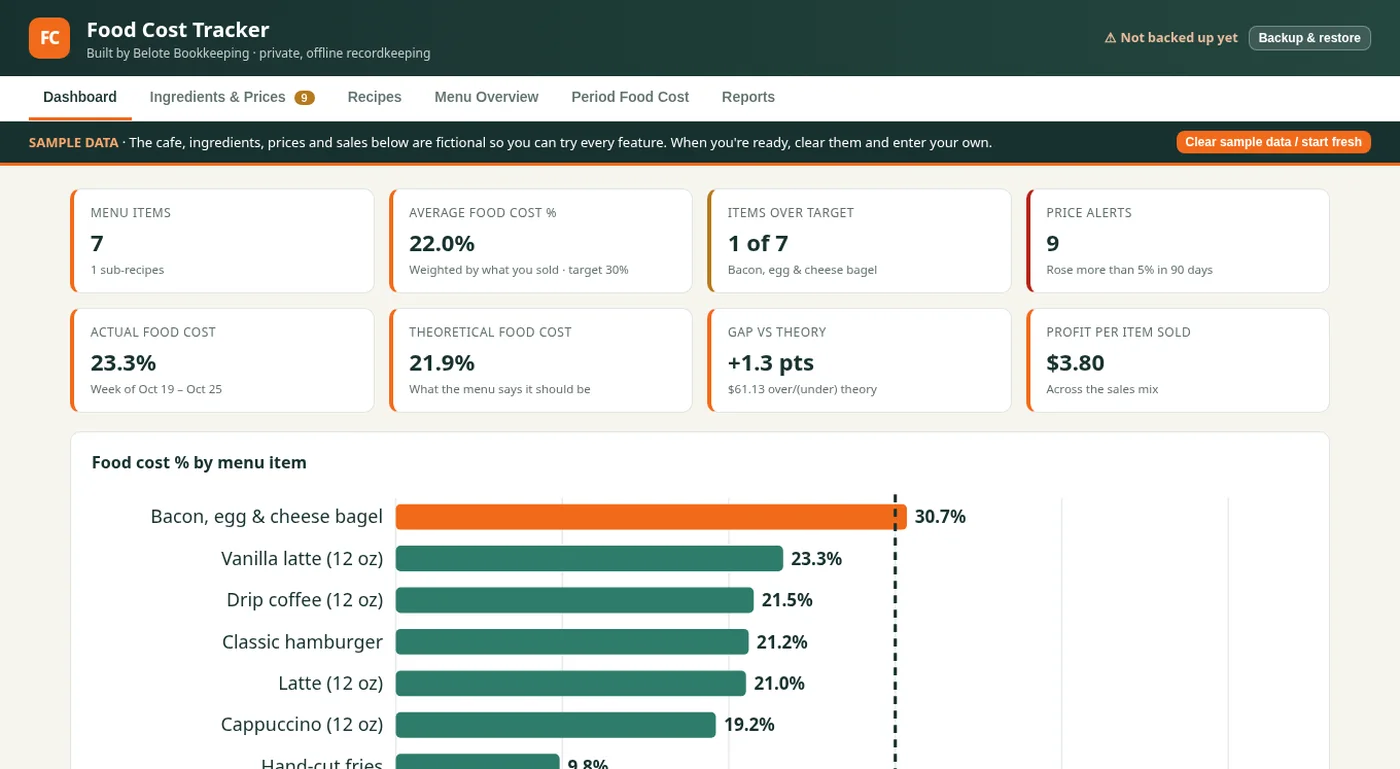
Food Cost Tracker dashboard with cards for menu items, average food cost percent, items over target and price alerts, above a bar chart of food cost percent by menu item against a 30 percent target
Dashboard: food cost % for every menu item against your target, plus price alerts and the gap between actual and theoretical food cost.
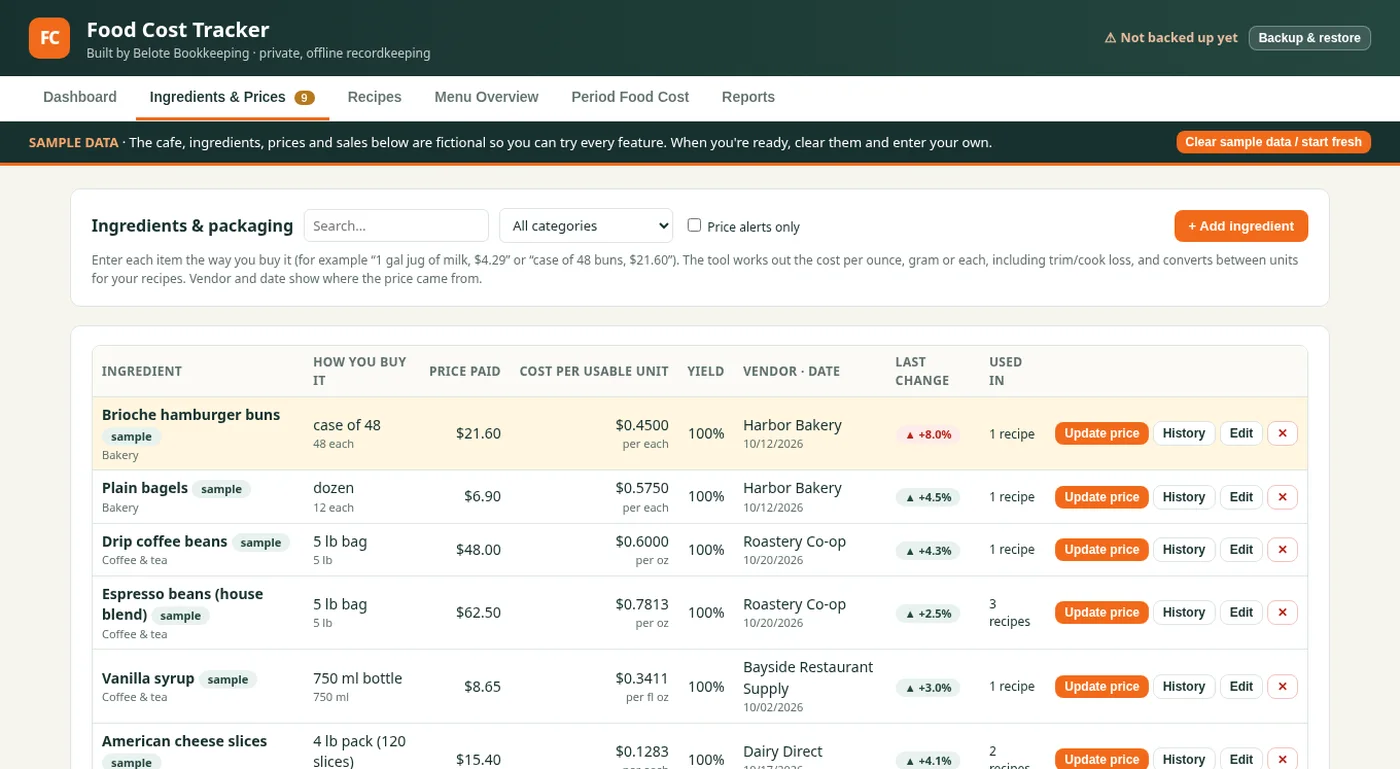
Food Cost Tracker Ingredients and Prices tab with a searchable list of sample ingredients, what each costs per case or bag, cost per usable unit and the last price change
Ingredients & Prices: enter each item the way you buy it (a case of buns, a 5 lb bag of beans) and it works out the cost per ounce, gram or each, with the last price change.
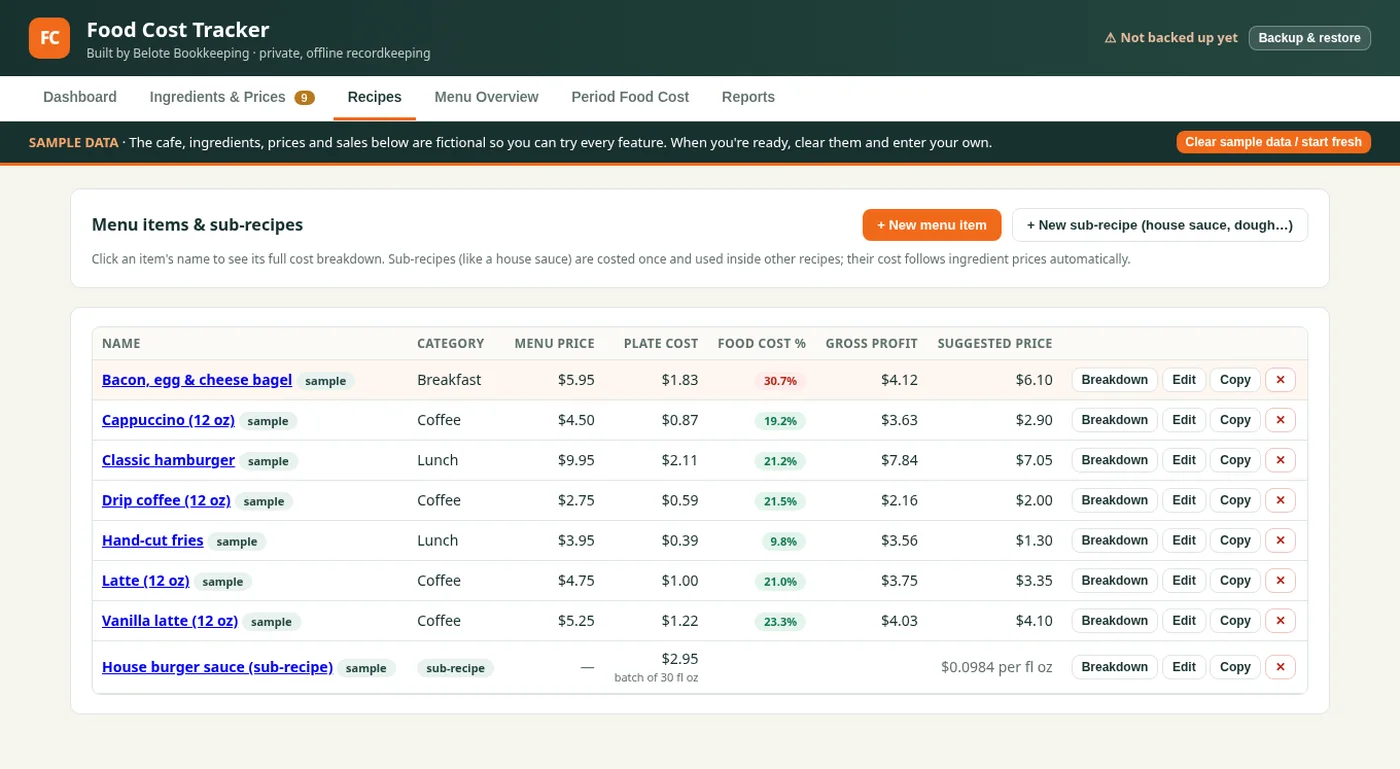
Food Cost Tracker Recipes tab listing sample menu items and a sub-recipe with menu price, plate cost, food cost percent, gross profit and suggested price
Recipes: every menu item and sub-recipe with its plate cost, food cost %, gross profit and a suggested price. Click a name to see the full cost breakdown.
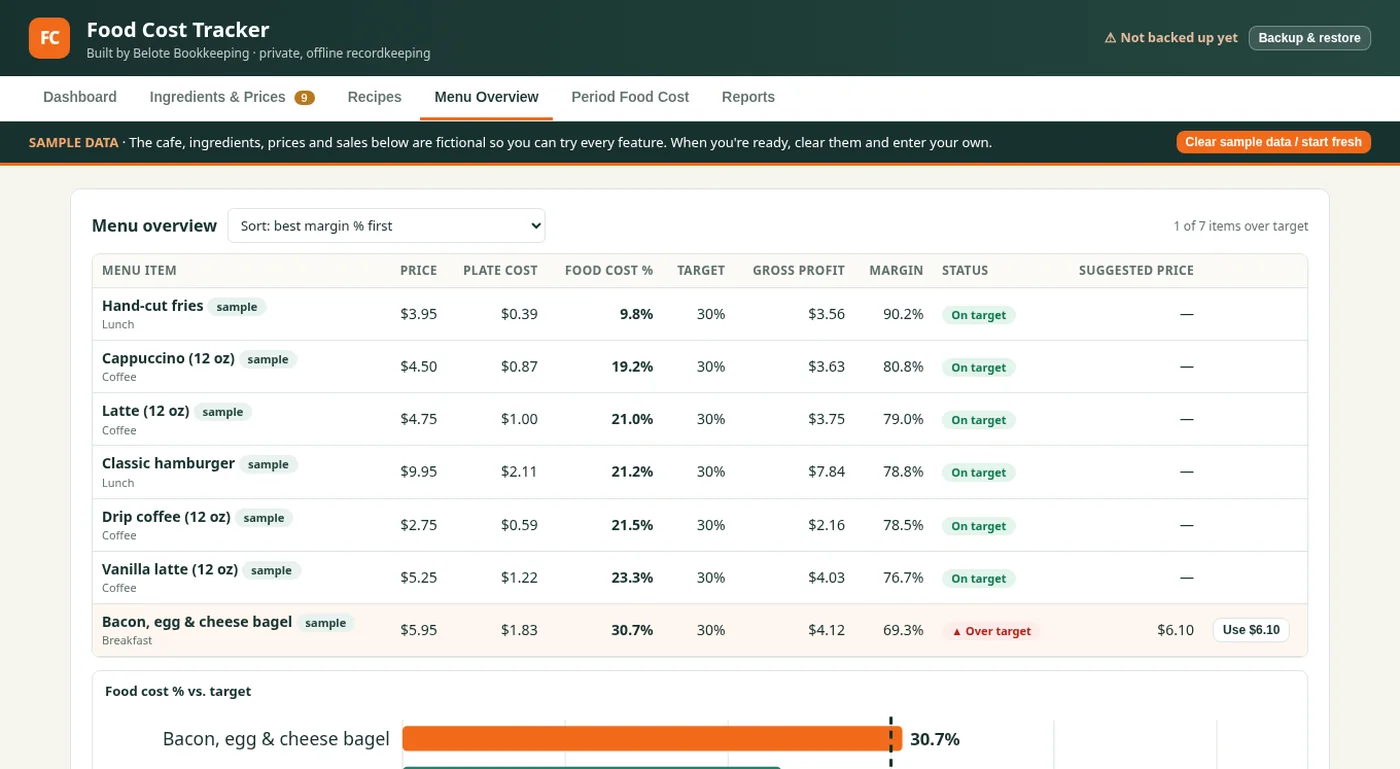
Food Cost Tracker Menu Overview tab ranking sample menu items by margin, flagged on target or over target, with a suggested price and a food cost chart below
Menu Overview: every item ranked by margin and flagged on target or over target, with a one-click suggested price for anything that needs fixing.
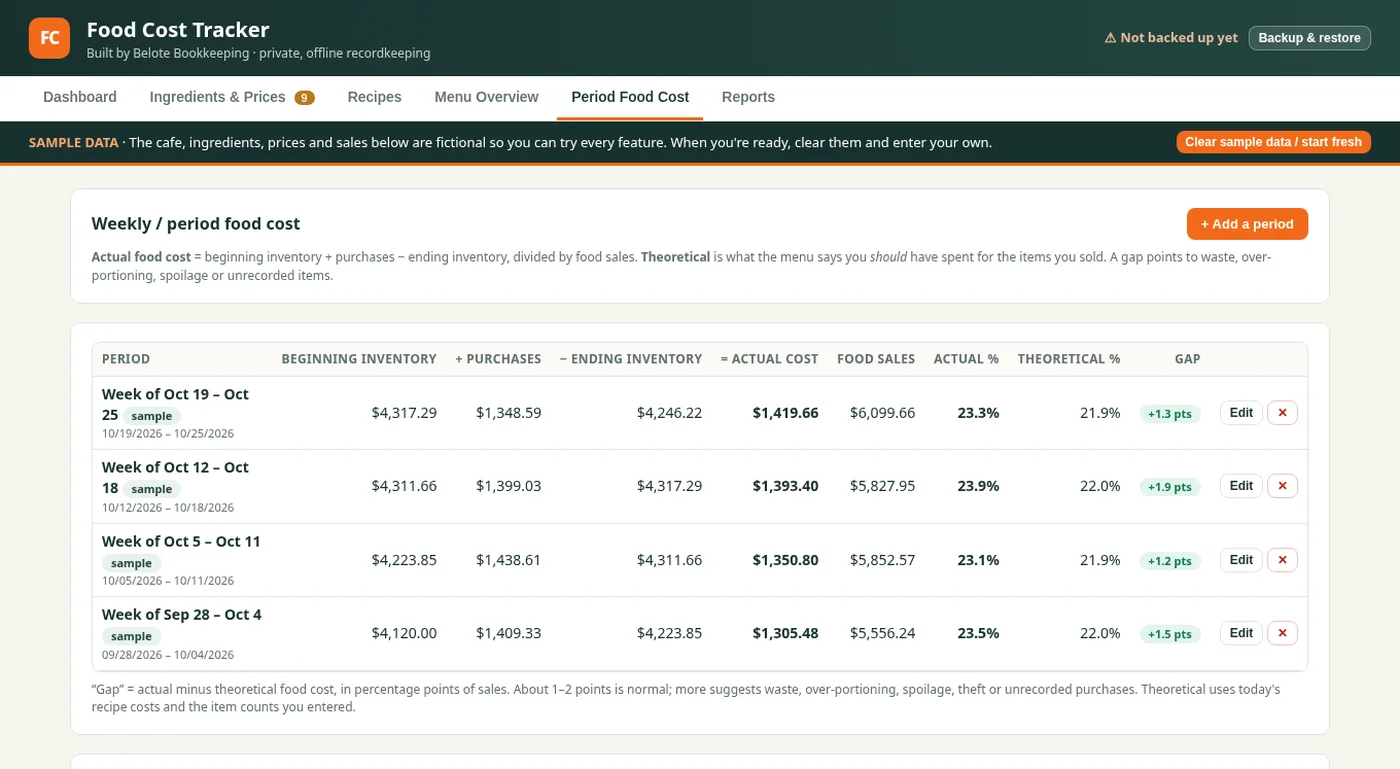
Food Cost Tracker Period Food Cost tab showing weekly actual versus theoretical food cost for sample weeks, with the gap in percentage points
Period Food Cost: weekly actual vs. theoretical food cost, so you can see where waste, over-portioning or unrecorded items show up.
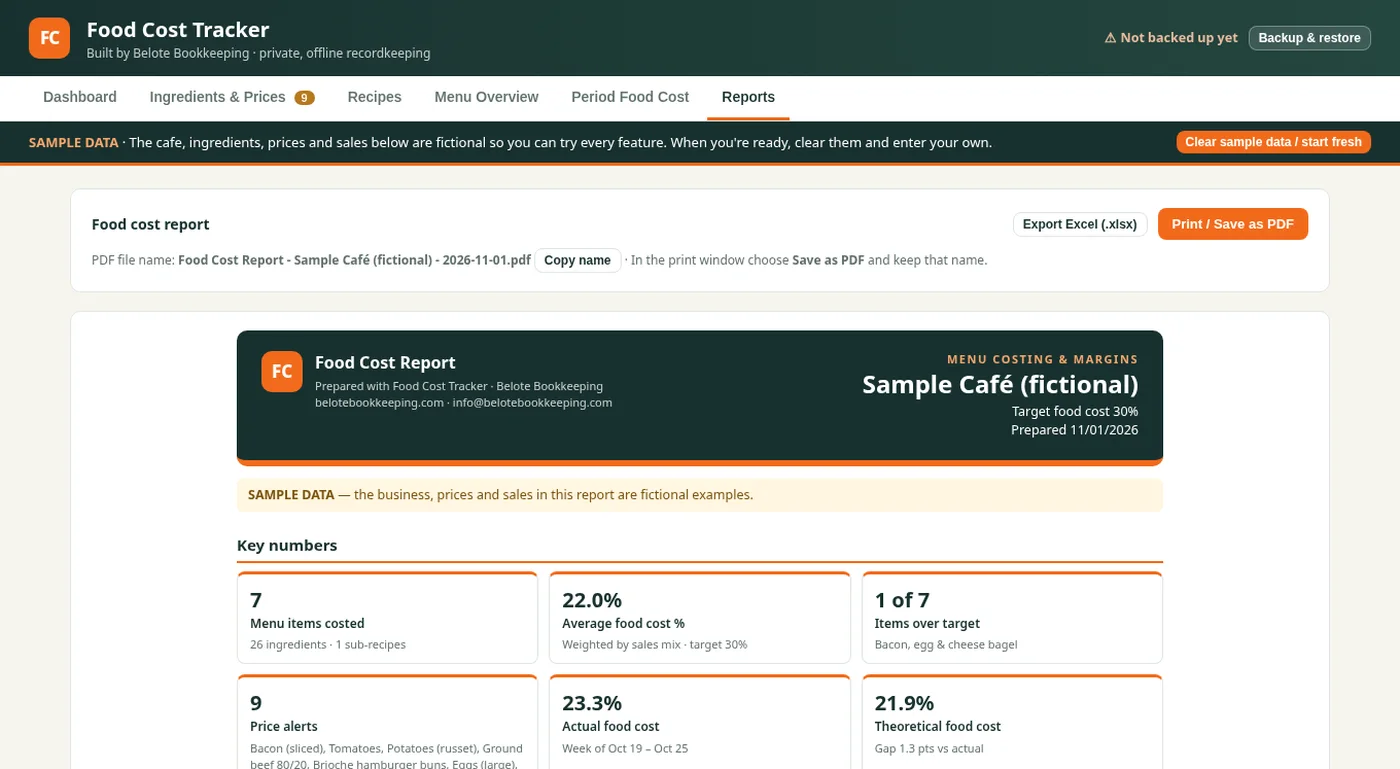
Food Cost Tracker Reports tab with a branded food cost report header and key numbers cards, plus buttons to export to Excel or save as PDF
Reports: a branded one-page food cost report you can print, save as PDF or export to Excel.

What it does

  • Cost per item
  • Margin and target price
  • Price-jump alerts
  • Weekly actual vs. theoretical
Ask about a tracker like this
Example work

Example: Rental Property Tracker

Rental Property Tracker: per-property income and expenses, Schedule E categories, rent roll, and a polished PDF report.

Sample data: the properties, tenants and numbers in these screenshots are fictional. It's a recordkeeping tool, not tax or legal advice. Pick a tab to see each screen, and click a screenshot to enlarge it.
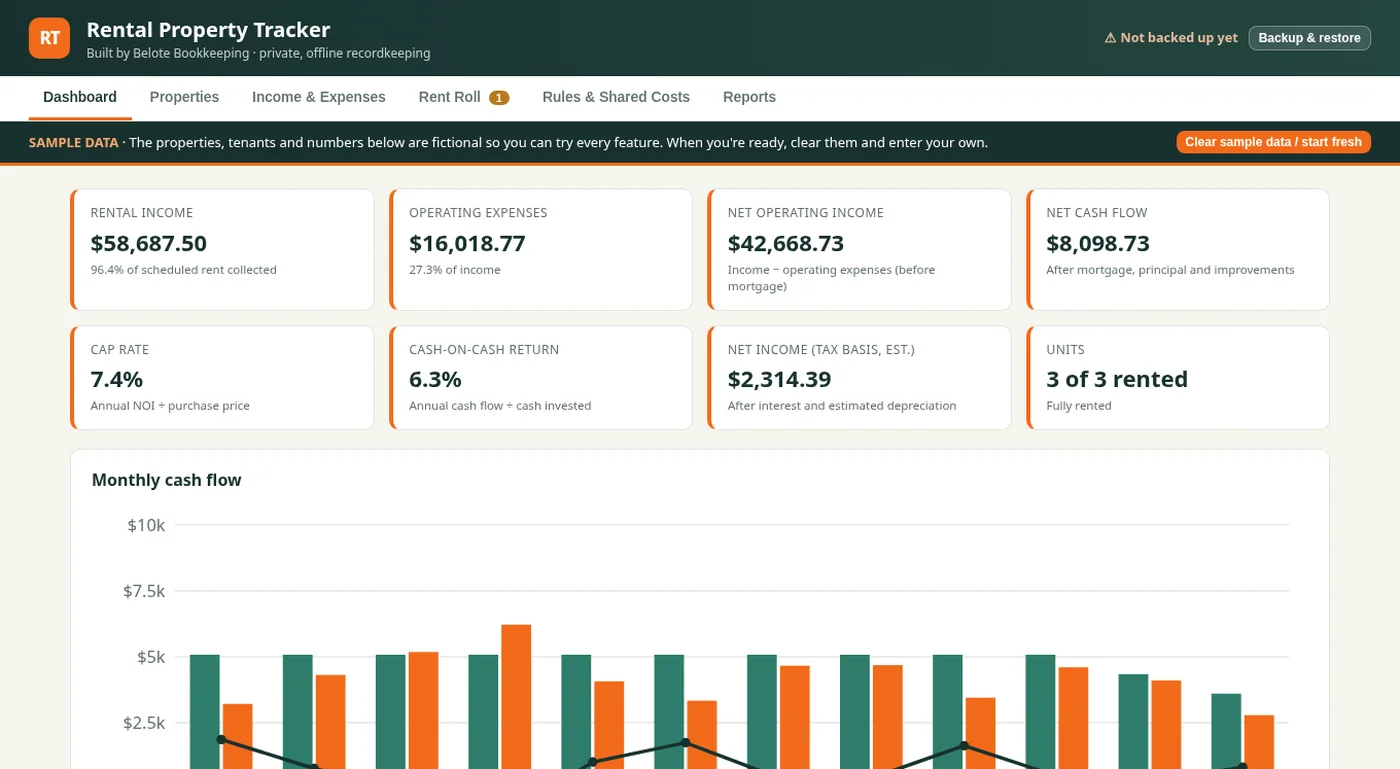
Rental Property Tracker dashboard with cards for rental income, operating expenses, net operating income, net cash flow, cap rate and cash-on-cash return, above a monthly cash flow chart
Dashboard: income, expenses, net operating income, cap rate and monthly cash flow at a glance, for all properties or one at a time.
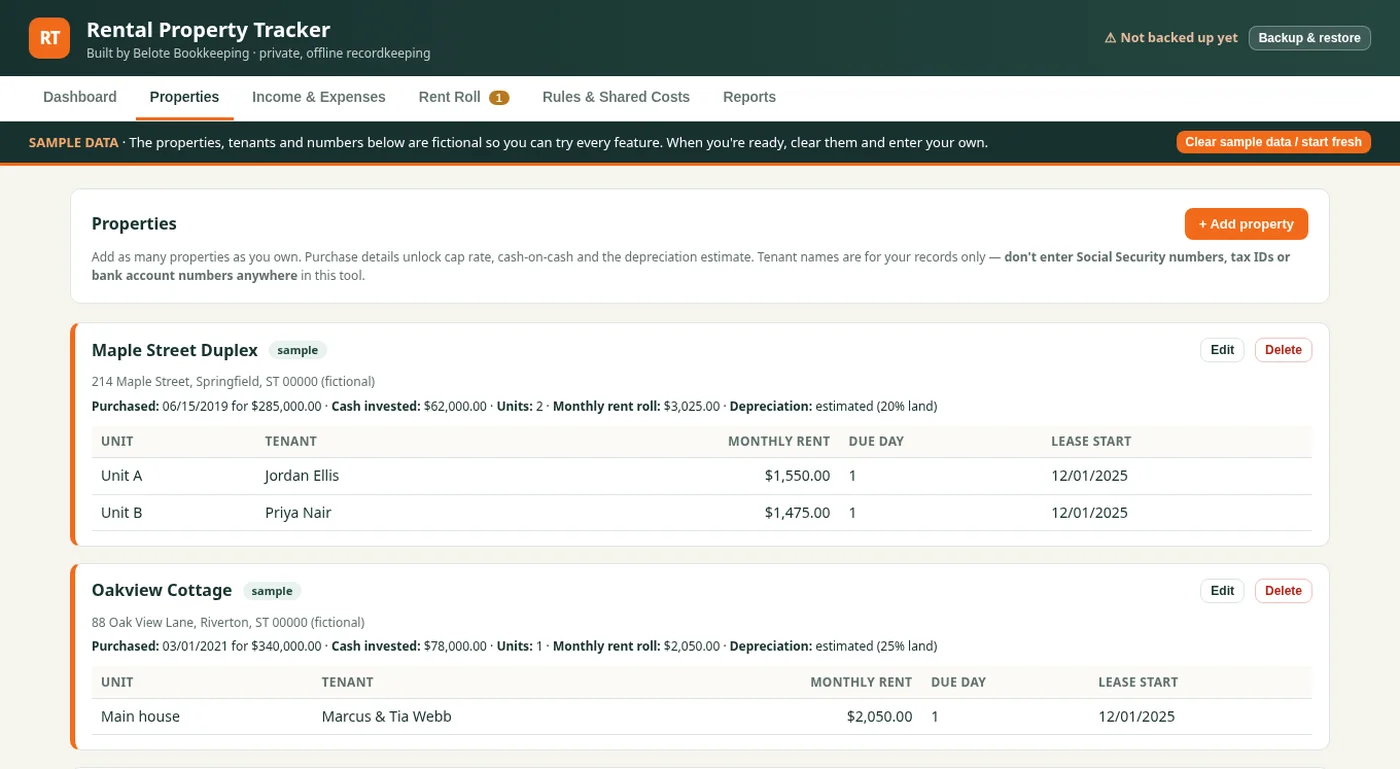
Rental Property Tracker Properties tab listing two sample properties with their units, tenants, monthly rent and purchase details
Properties: each property with its units, tenants, rent and purchase details. Those details unlock cap rate, cash-on-cash return and a depreciation estimate.
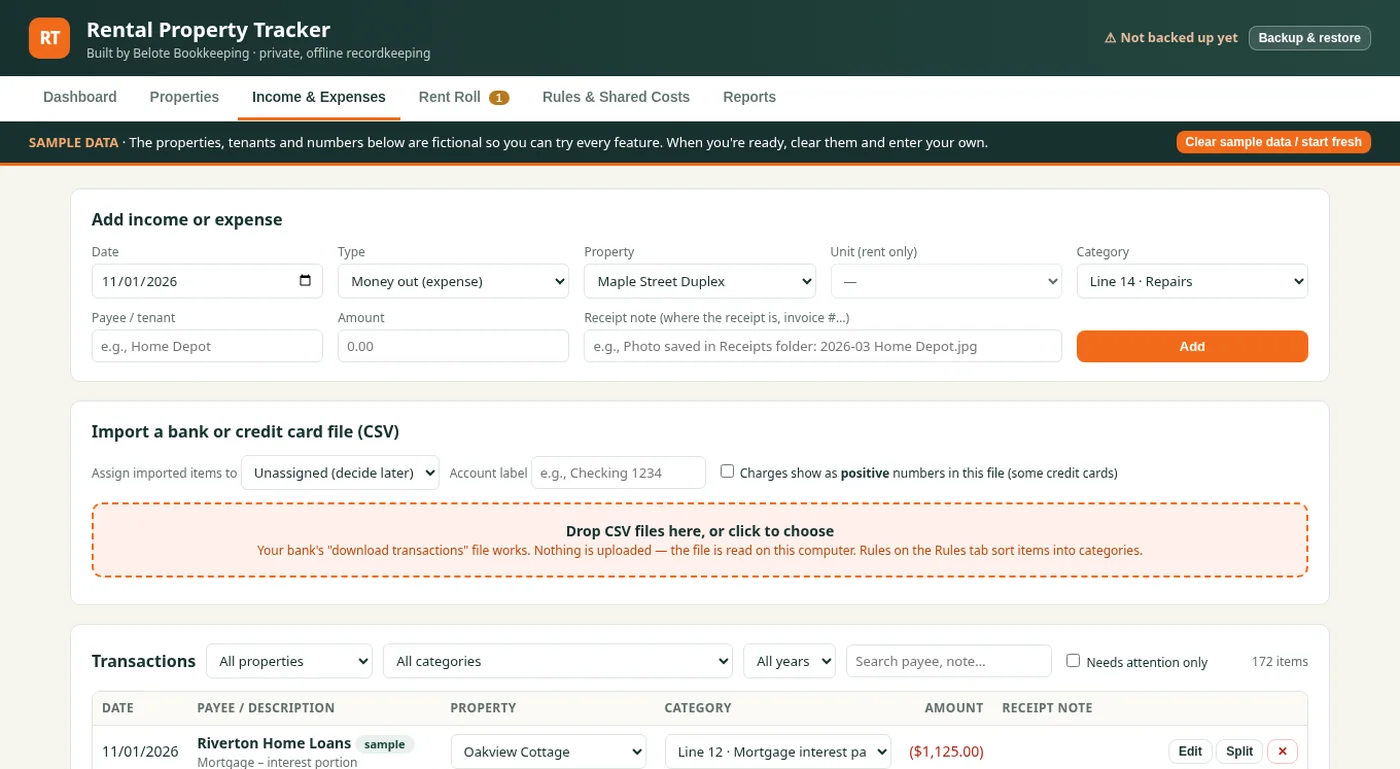
Rental Property Tracker Income and Expenses tab with a form to add income or an expense, a bank file import box and a transactions list
Income & Expenses: add income or an expense by hand, or drop in a bank or card CSV and sort every entry into a Schedule E category.
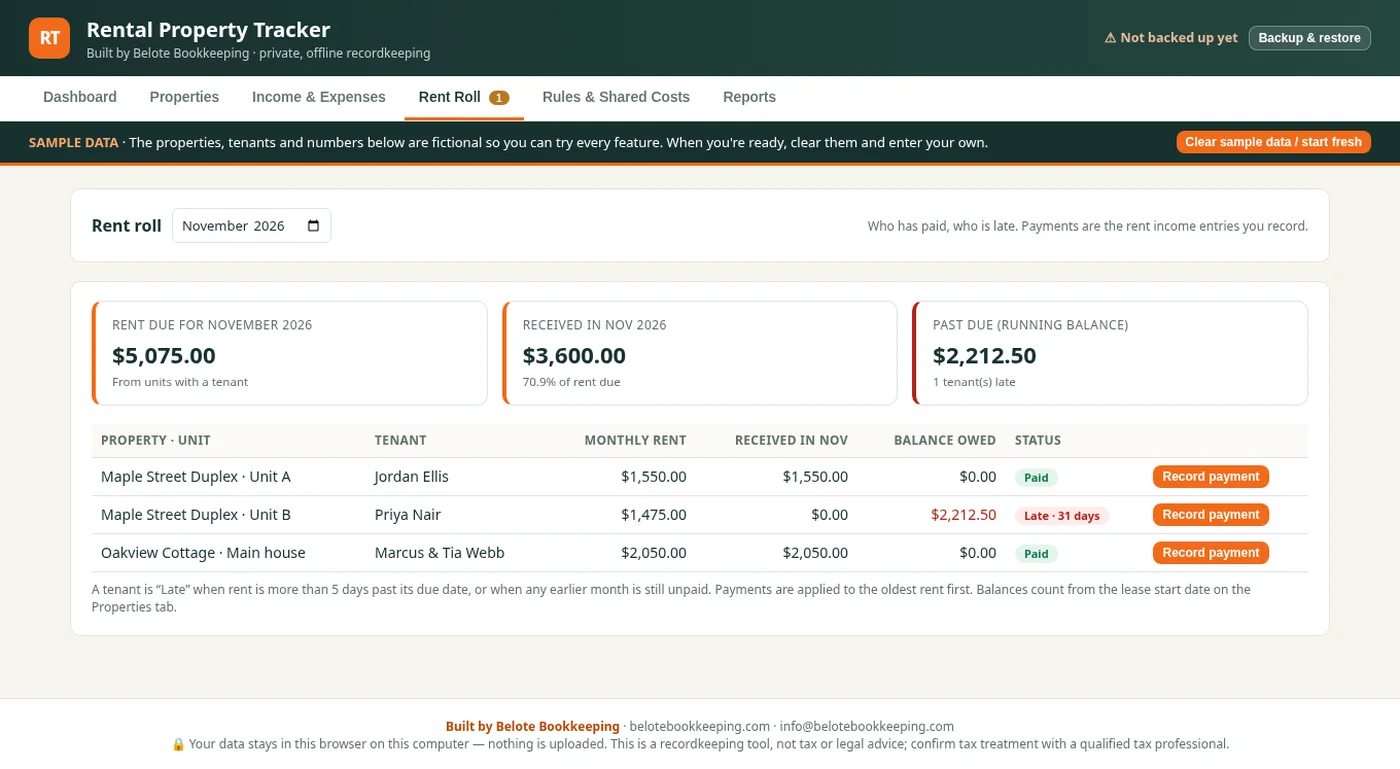
Rental Property Tracker Rent Roll tab with cards for rent due, received and past due, and a list showing which sample tenants have paid and who is late
Rent Roll: who has paid, who is late and how much is owed, with a one-click way to record a payment.
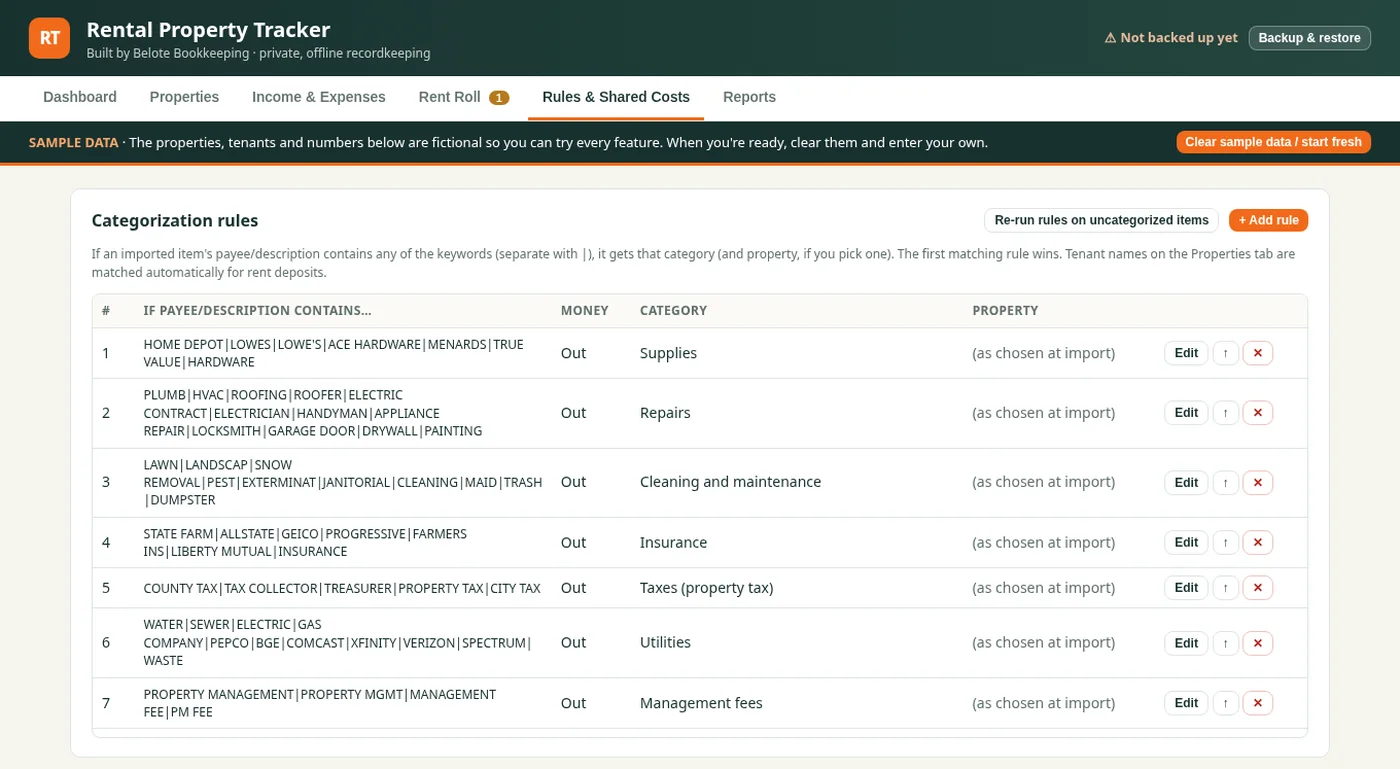
Rental Property Tracker Rules and Shared Costs tab listing keyword rules that sort imported transactions into categories
Rules & Shared Costs: keyword rules that sort imported transactions into categories for you, and shared costs you can split across properties.
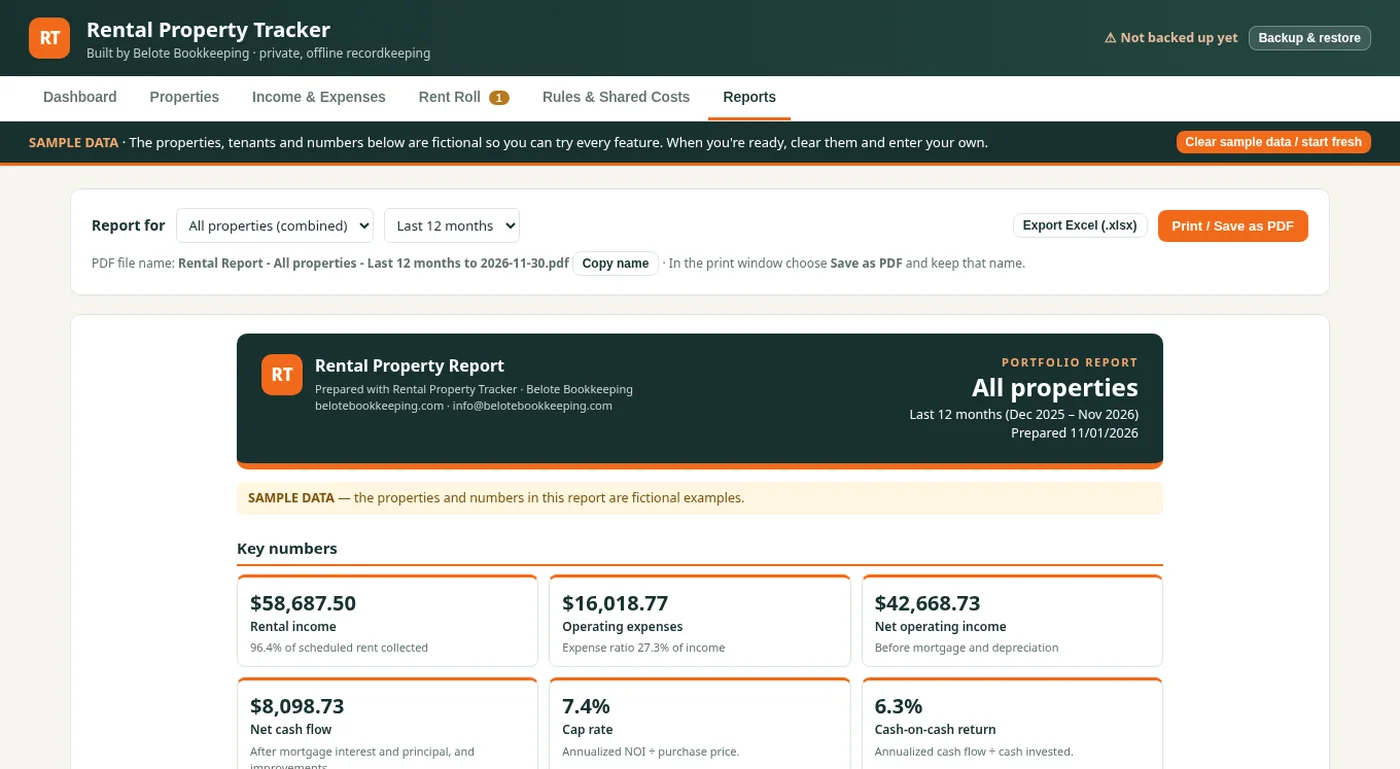
Rental Property Tracker Reports tab with a branded rental property report header and key numbers cards, plus buttons to export to Excel or save as PDF
Reports: a polished one-page report with key numbers and a cash-flow chart, ready to print, save as PDF or export to Excel.

What it does

  • Per-property income and expenses
  • Schedule E categories
  • Rent roll
  • PDF and Excel reports
Ask about a tracker like this
More examples

A look at my own app, Belote Books.

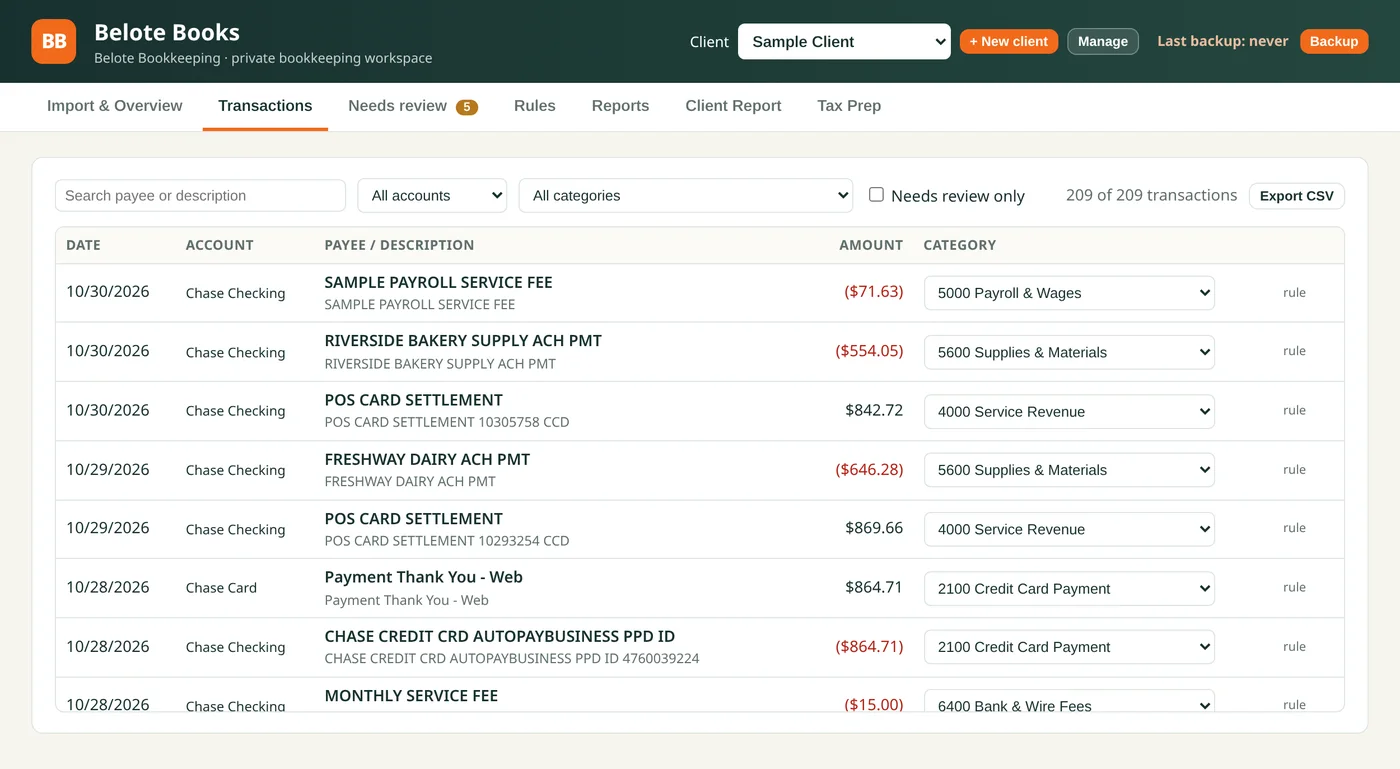
Here's the kind of clean, simple screen I build. These screens use a made-up sample client, so no real client data is shown. Click any screenshot to enlarge it.
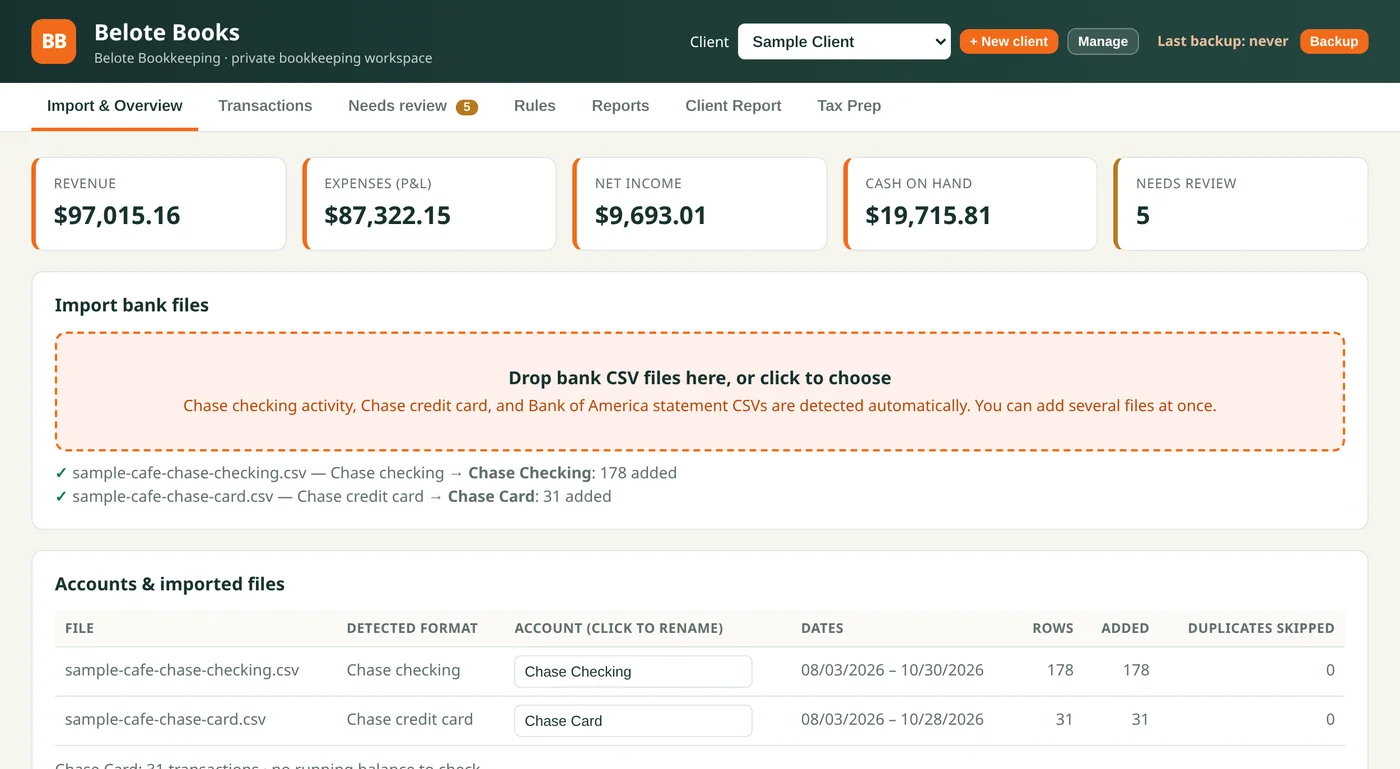
Belote Books Import and Overview screen for a sample cafe client, with revenue, expenses, net income, cash on hand and needs-review cards, a bank file import confirmation and an accounts table
Import & Overview: drop in bank CSV files, check that every row ties to the bank balance, and see revenue, expenses, net income and cash at a glance.
Belote Books Transactions screen listing sample cafe bank transactions with search and filters, and a category already filled in for each row
Transactions: every imported row in one searchable list, with the category already filled in by your rules.
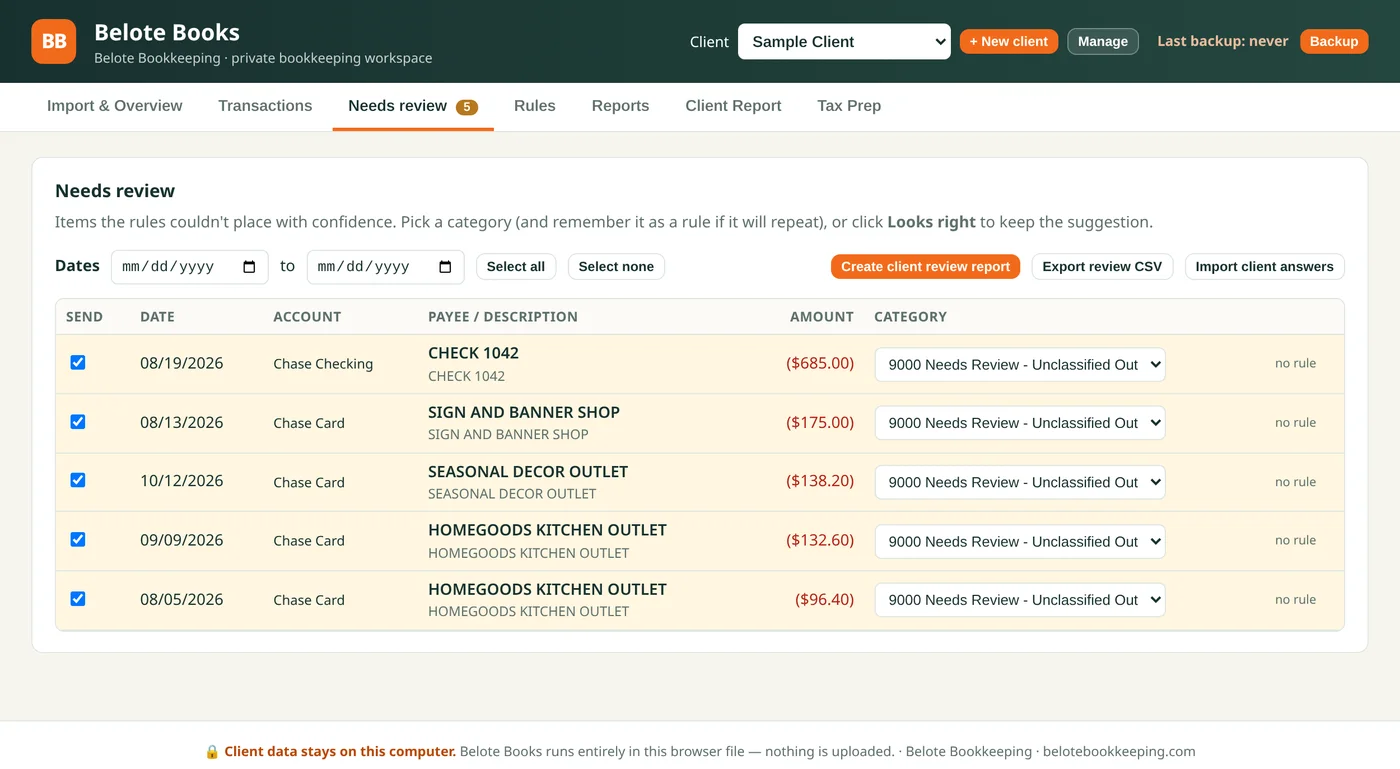
Belote Books Needs review screen listing five sample cafe transactions the rules could not place, each with a category picker
Needs review: anything the rules can't place goes to a review list, so nothing gets guessed.
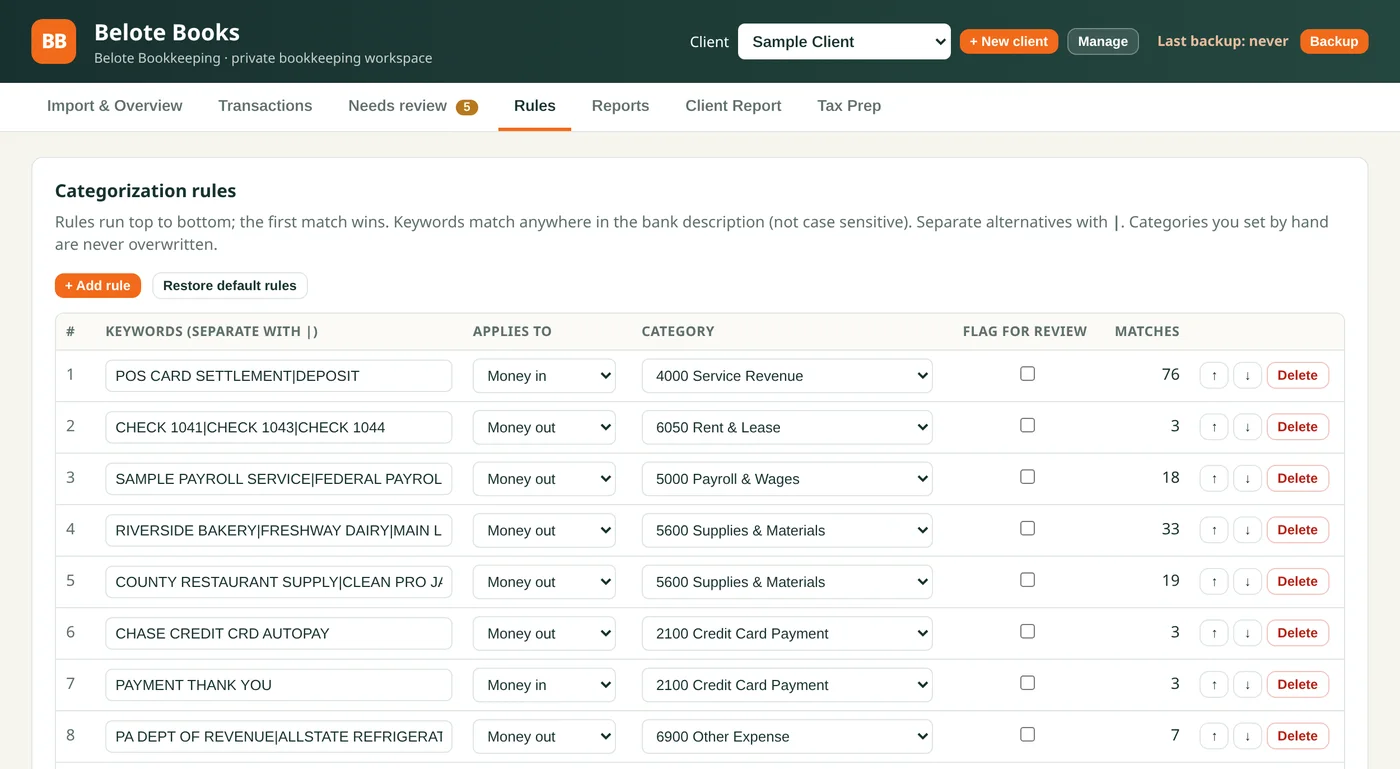
Belote Books Rules screen showing categorization rules with keywords, money in or out, a category and match counts
Rules: plain-English keywords that sort each bank description into the same category every month. The first match wins.
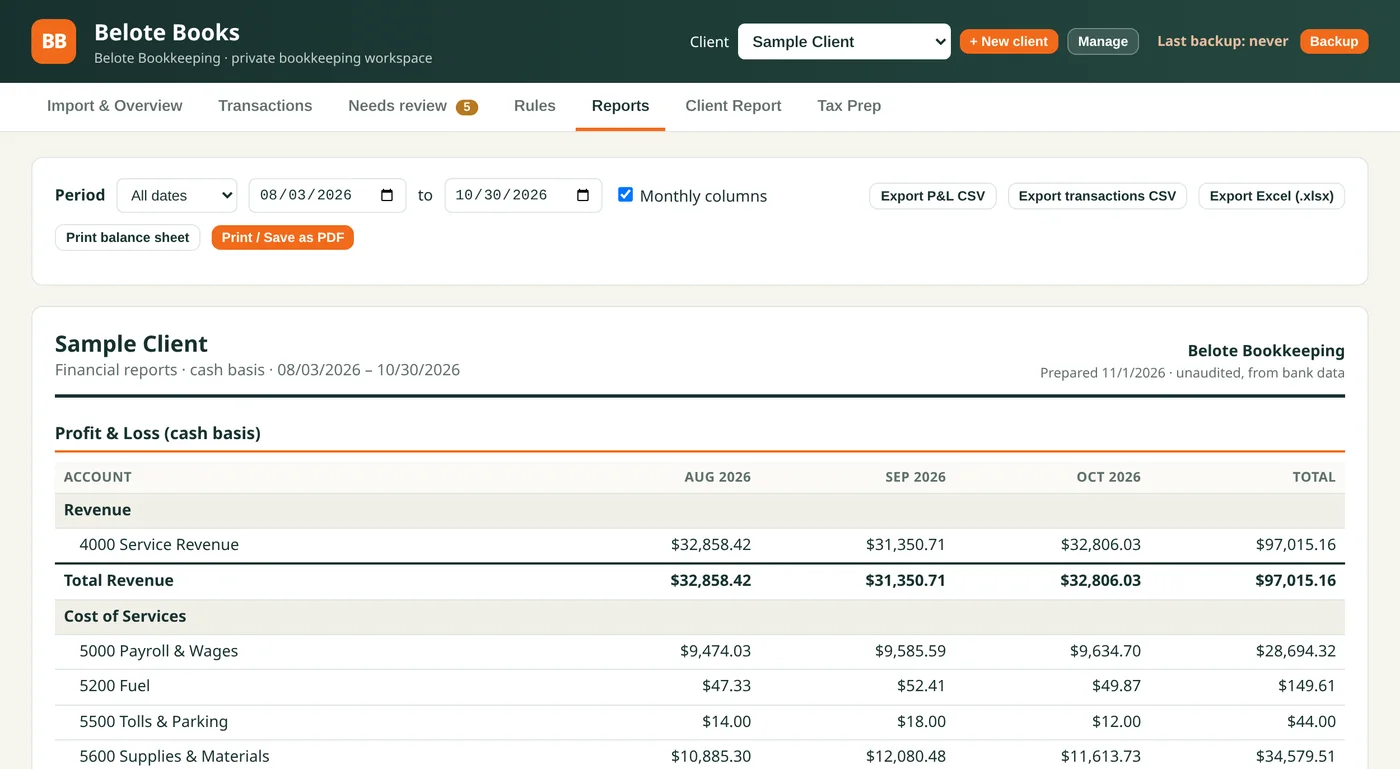
Belote Books Reports screen for a sample client showing a monthly profit and loss by account for August, September and October, with export buttons for CSV, Excel and PDF
Reports: a monthly profit and loss you can export to Excel or PDF.
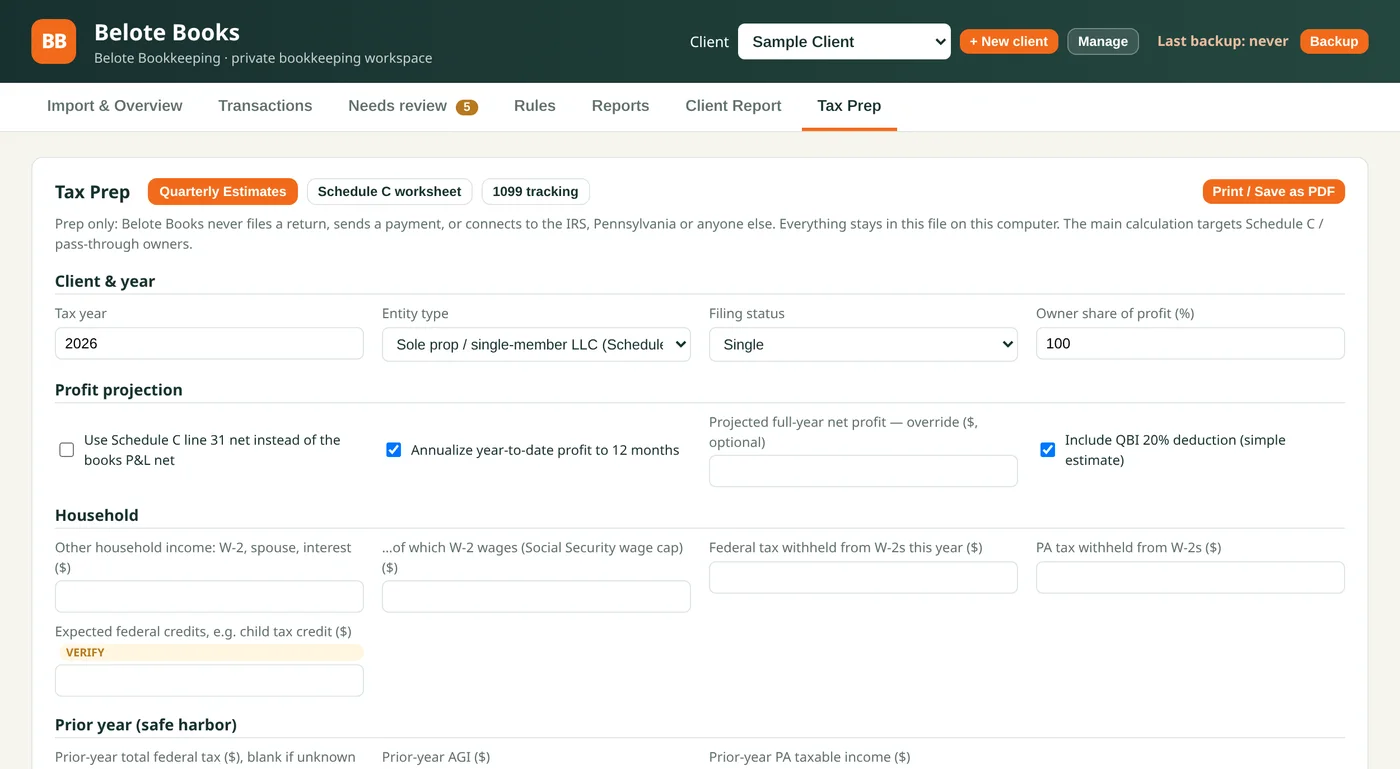
Belote Books Tax Prep screen with quarterly estimate inputs for tax year, entity type, filing status and profit projection
Tax Prep: a planning worksheet for quarterly estimates, Schedule C and 1099 tracking. It never files anything.
How it works

Simple steps, and you know the price up front.

01 — Free discovery call

We spend 30 minutes on how you track your numbers today and what you'd like to see. No obligation.

02 — Flat-price scope

I send a written scope of what I'll build with one flat price, so there are no surprises.

03 — I build it

I build your tool, check its numbers against your records, and walk you through it before you rely on it.

04 — Optional care plan

Want ongoing updates and someone to call when you have a question? Add a monthly care plan. It's entirely optional.

What it costs

Clear starting prices, with a flat quote before I build.

Final pricing depends on what your tool needs to do. You'll see one flat price in writing before any work begins.

Business Check-Up

Not sure what you need?
$350
  • A review of how you track your numbers today
  • A written recommendation of what to build

Starter Tool

One focused tool
from $1,500
  • One tracker, dashboard or report
  • Flat-price scope

Standard Tool

A fuller tool
from $3,000
  • More views, data sources or reports
  • Flat-price scope

Custom Build

Larger or more complex
from $5,000
  • Quoted after a discovery call
  • Built around your workflow

Optional care plan: $50–$100 a month

Keep your tool working and up to date, with small updates and someone to ask when you have a question. The price depends on the tool.

Founding-client rate

For my first few Custom Business Tools clients, I offer a founding-client rate in exchange for a short testimonial or case study once your tool is running. Ask me about it on the discovery call.

FAQ

Questions about custom business tools.

What are Custom Business Tools?

They're small, custom-built apps for your business: a cash-flow dashboard, an expense tracker, a food cost tracker for a cafe, a rental property tracker, a job-costing sheet or a client report. I build each one around your real numbers and the way you actually work, instead of making you fit a generic template.

Why have a bookkeeper build my tool?

A bookkeeper knows where the numbers come from and how they should add up. I design your tool so it matches your books and shows what you actually need to see, like what's coming in, what's going out and what's left.

Do you use AI to build these?

Yes. I use AI-assisted tools to build faster, which helps keep prices fair. But I design every tool myself and check its numbers against your records before you rely on it. It's a tracking and reporting tool, and it's not a replacement for your books or for advice from a tax professional.

How much does a custom tool cost?

A Business Check-Up is $350. A Starter Tool starts at $1,500, a Standard Tool starts at $3,000, and a Custom Build starts at $5,000 and is quoted after we talk. After the free discovery call you get a flat-price scope in writing, so you know the cost before I start building.

What happens on the free discovery call?

We spend about 30 minutes talking through how you track your numbers today, what's frustrating about it and what you'd like to see at a glance. There's no obligation. If a tool isn't the right fit, I'll tell you.

What is the founding-client rate?

For my first few Custom Business Tools clients, I offer a founding-client rate in exchange for a short testimonial or case study once your tool is up and running. Ask me about it on the discovery call.

What does a care plan include?

A care plan is optional and runs $50 to $100 a month, depending on the tool. It's there so your tool keeps working and keeps up with your business, with small updates and someone to ask when you have a question.

Let's talk

Tell me what you wish you could see at a glance.

Book a free 30-minute discovery call. We'll talk through your numbers and what a custom tool could do for your business. No commitment either way.

— Freddie Belote, Belote Bookkeeping